Inventory Frame
Use a Blueprint child of UUW_InventoryFrame. The supplied content includes BP_InventoryFrame, BP_CurrencyFrame
and BP_PermanentFrame. Create it with a valid owning player after the player has a Pawn and a resolvable
inventory component.
Required Widget Bindings
The native frame requires these exact BindWidget names and types:
| Name | Type |
|---|---|
SizeBox_0 | SizeBox |
VerticalBox_0 | VerticalBox |
HorizontalBox_0 | HorizontalBox |
SizeBox_1 | SizeBox |
BTN_Filter | Button |
HorizontalBox_1 | HorizontalBox |
ScrollBox_0 | ScrollBox |
Keep these bindings when changing the layout. NativeDestruct uses ScrollBox_0 directly. A child without the required
hierarchy is not a supported custom frame.
Configure the Inventory Source
Set InventoryIdentityTag on the frame to the component's exact identity tag. The PDF calls this SlotTag; SlotTag
is actually a field on UUW_InventoryEntry, while the frame uses InventoryIdentityTag. The frame passes its tag to
created entries as their SlotTag.
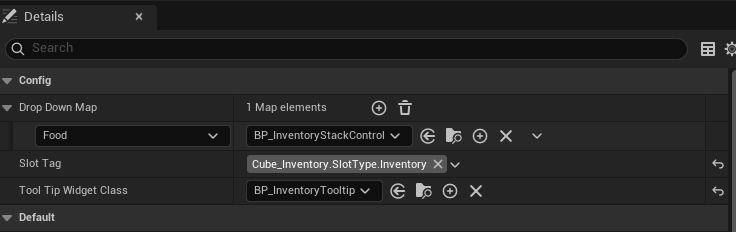
InventoryEntryClass comes from project settings. Configure ToolTipMap there too; screenshot labels and saved Blueprint settings may differ from the current native fields.
Runtime Behavior
NativeConstruct resolves the component, binds its slot delegates, loads the entry widget class and builds widgets for the current snapshot. Entries are tracked in InventoryEntryMap by SlotID. An empty inventory initially creates no entries; later receive events can populate it.
NativeDestruct unbinds slot delegates and clears references. InitAfterBPConstruction can rebuild the map, but does not clear all old ScrollBox children before adding new ones; repeated calls need a deliberate refresh strategy. For respawn or changed possession, recreate/rebind the frame after the new component is available.
Filter button binding provides a UI element; the native frame does not implement a complete filter system. See Widget and UI Reference.